Toto je starší verze dokumentu!
var person = {
  firstName: "John",
  lastName: "Doe",
  age: 50,
  eyeColor: "blue"
};
Vlastnosti objektu
objectName.propertyName
// nebo
objectName["propertyName"]
var person = {
  firstName: "John",
  lastName : "Doe",
  id       : 5566,
  fullName : function() {
    return this.firstName + " " + this.lastName;
  }
}
Přístup k metodě objektu
//objectName.methodName();
name = person.fullName();
1)
var patt = /w3schools/i;
var str = "Visit W3Schools";
var n = str.search(/w3schools/i);
// výsledek: 6
var str = "Visit Microsoft!";
var res = str.replace(/microsoft/i, "W3Schools");
// Visit W3Schools!
<!DOCTYPE html><html><body><p id="demo"></p><script>

var w = window.innerWidth;
var h = window.innerHeight;
var x = document.getElementById("demo");
x.innerHTML = "Browser inner window width: " + w + ", height: " + h + ".";

</script></body></html>
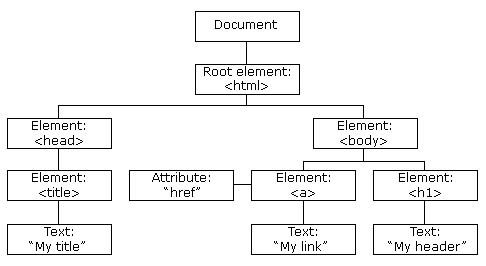 2)
2)
<html>
<body>

<p id="demo"></p>

<script>
document.getElementById("demo").innerHTML = "Hello World!";
</script>

</body>
</html>
Hledání HTML tagů
| Metoda | Popis |
| document.getElementById(id) | Najde tag podle id |
| document.getElementsByTagName(name) | Najde všechny tagy podle nazvu tagu |
| document.getElementsByClassName(name) | Vyhledá všechny tagy podle třídy |
Změny HTML tagů
| Vlastnost | Popis |
| element.innerHTML = new html content | Změni obsah mezi HTML tagy |
| element.attribute = new value | Změní hodnotu atributu HTML tagu |
| element.style.property = new style | Změní hodnoty v položce style |
| Metoda | Popis |
| element.setAttribute(attribute, value) | Nastavý nový atribut tagu a jeho hodnotu |
Přidat a odebrat html tag
| Metoda | Popis |
| document.createElement(element) | Vytvoří HTML tag |
| document.removeChild(element) | Smaže HTML tag |
| document.appendChild(element) | Přidá HTML tag |
| document.replaceChild(new, old) | Nahradí HTML tag |
| document.write(text) | Zapisuje do výstupního streamu |
<html>
<body>

<p id="demo"></p>

<script>
document.getElementById("demo").innerHTML = "Hello World!";
</script>

</body>
</html>
https://www.w3schools.com/js/tryit.asp?filename=tryjs_dom_animate_3
onClick
<h1 onclick="this.innerHTML = 'Ooops!'">Click on this text!</h1>
<script>
document.getElementById("myBtn").onclick = displayDate;
</script>
onMouseOver / onMouseOut
<div onmouseover="mOver(this)" onmouseout="mOut(this)"
style="background-color:#D94A38;width:120px;height:20px;padding:40px;">
Mouse Over Me</div>

<script>
function mOver(obj) {
  obj.innerHTML = "Thank You"
}

function mOut(obj) {
  obj.innerHTML = "Mouse Over Me"
}
</script>
onMouseDown / onMouseUp
<div onmousedown="mDown(this)" onmouseup="mUp(this)"
style="background-color:#D94A38;width:90px;height:20px;padding:40px;">
Click Me</div>

<script>
function mDown(obj) {
  obj.style.backgroundColor = "#1ec5e5";
  obj.innerHTML = "Release Me";
}

function mUp(obj) {
  obj.style.backgroundColor="#D94A38";
  obj.innerHTML="Thank You";
}
</script>
onKeyDown
<head>
<script>
function myFunction() {
  alert("You pressed a key inside the input field");
}
</script>
</head>
<body>

<p>A function is triggered when the user is pressing a key in the input field.</p>

<input type="text" onkeydown="myFunction()">

</body>
Další události
https://www.w3schools.com/js/js_events_examples.asp
